

Buzzer has gone “live” in the Noordhoek valley!
Many residents may have heard of the Buzzer application (“app” in short), which was created in Hout Bay and has since taken South African neighbourhoods by storm. It has received multiple awards as best app in South Africa. Used on a smart phone, it is an app that allows anyone (resident, employee or visitor) within a certain area to generate alerts. Most importantly SOS emergency alerts, but also alerts relating to Fire, Medical, Accidents, Wildlife or Suspicious activity. These alerts are sent to control rooms who then respond accordingly. They are also visible to other users in the same area, which helps in making us all aware of what is happening in our neighbourhoods.
We are very excited to announce that the Neighbourhood Watches of Chapman’s Peak and Dascro have joined forces to bring Buzzer to the valley! As a community we currently use a variety of communication channels (various Facebook pages and whatsapp groups) to achieve distribute information, but invariably there is duplication of information and important groups are excluded (employees, visitors). Buzzer brings all these information sources together and puts them at the fingertips of everyone in the area in real time.
From the www.buzzer-app.co.za website:
“Users can get help in an emergency by pushing the SOS button. No need to remember the right number, or even try and explain your situation while adrenaline levels are high. If your community is connected to professional responders, they will already be en route the moment your SOS is received.
In situations where it isn’t an immediate emergency, users also have the option to report an incident to give more information about the situation.
Here are some of the options:
- Suspicious – this can be related to activity, people or vehicles that need to be investigated
- Fire – report smoke or fire coming from a home or green area
- Municipal – alert your community and responders to burst water pipes, damage to roads, broken street lights etc
- Crime – report incidents related to criminal activity such as theft out of a motor vehicle
- Medical – get medical help by sending out an alert to your community. This can allow first aiders near you to provide help until paramedics arrive
- Traffic – alert your community to traffic accidents or interruptions
- Wildlife – report snakes or baboons in the area and get help to safely remove them from your property”
In order to make Buzzer possible in our valley, Chapmans Peak Neighbourhood Watch (CPNW) and Dascro joined forces and agreed to pay for the licenses required. We hope that other areas in the valley will also join in future, thereby increasing the coverage of the app.
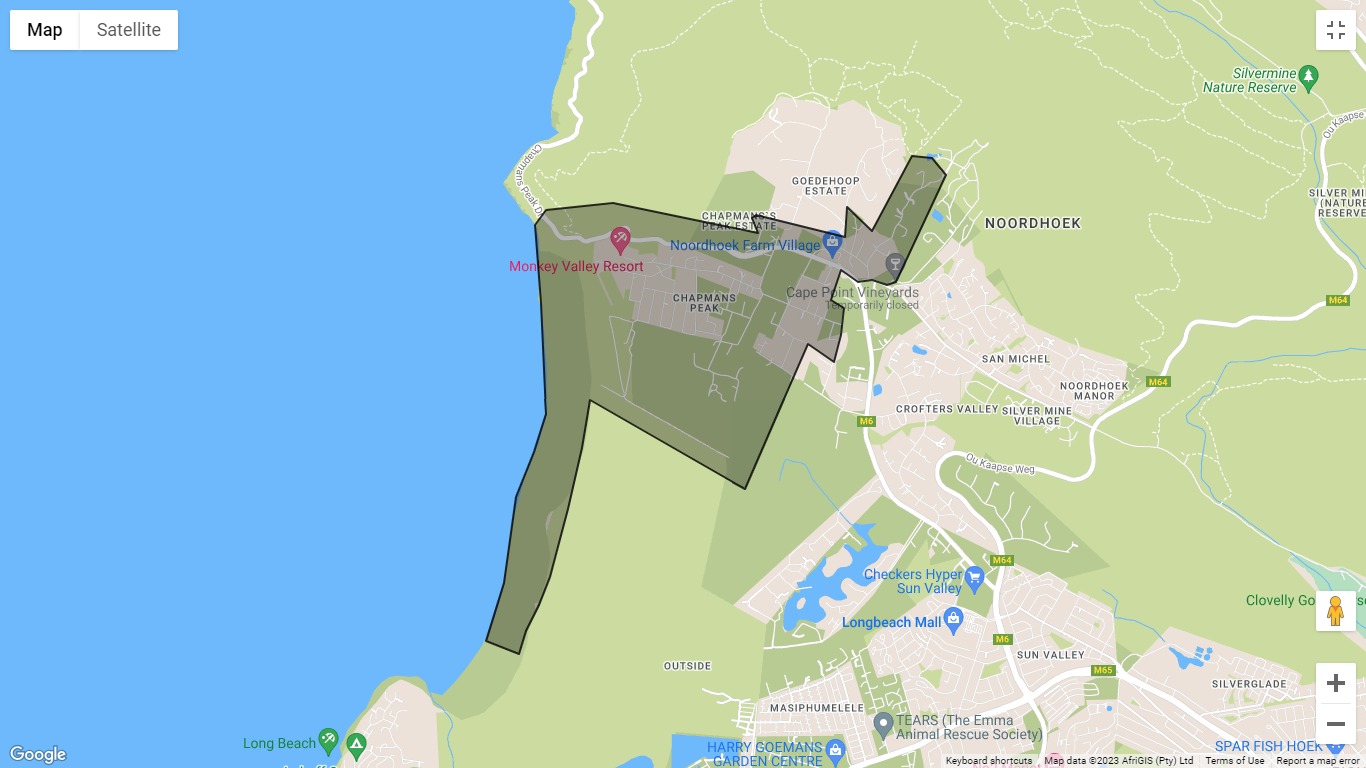
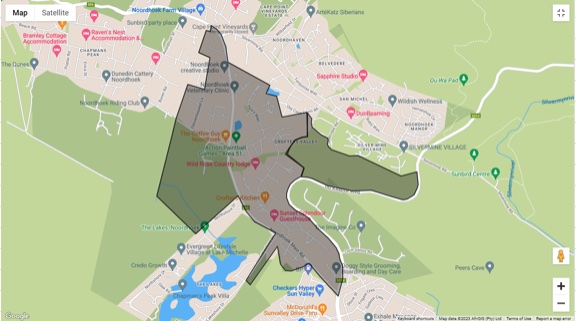
For our area (see map) the DBS control room (Hout Bay) and ADT control room (Kommetjie Road) will receive all alerts and will respond accordingly. Separately, each Neighbourhood Watch will have control panels that also receive the alerts for their communities. These NW control panels are more for controlling local incidents and sending out local broadcast messages. Note that the beach, part of the wetland and the koppie have been added to CPNW, and Dascro areas.
So how does it work?
- First you need to download the app (free) and install it on your smartphone. Please also ask your family members, employees and visitors to install the app
- After installing each user must choose their residence as their “home location”. This will allow the app to know that you are within an area covered by the partnering neighbourhood watches
- In the event that you have an emergency, press the SOS button. There will be a countdown which allows you to cancel the SOS alert if you pressed it by mistake. After the countdown lapses the SOS alert will be sent to the DBS and ADT control rooms. One of them will call you to ask you what the emergency is about and to initiate a response
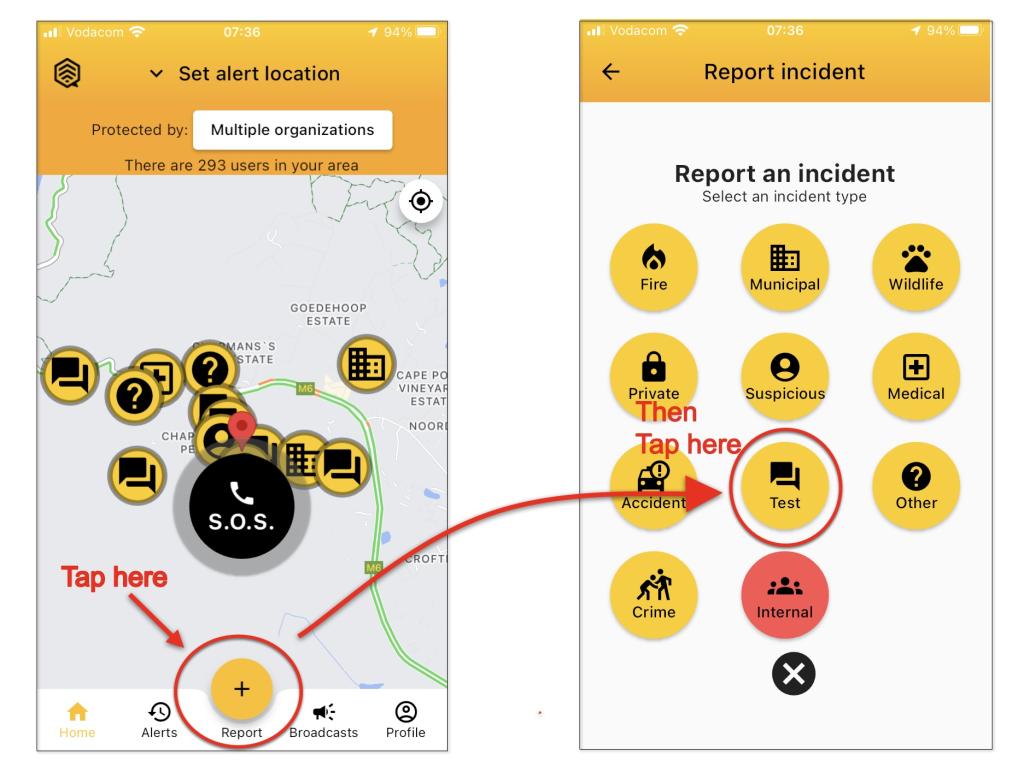
- If you want to make another type of alert, press the “+” button at the bottom of the screen, which brings you to a screen. After making your choice of alert the control room will reach out to ask you more details so that they can tailor their reaction.
- In parallel, the app will recognise in which area your alert has been made and everyone who is in your area (and who has installed Buzzer) will also get an alert.
- Should the need arise then the control room or Neighbourhood Watches can send out broadcast messages informing the whole valley or a specific area within the valley of important information that should be shared. These will be shown under “Alerts”
So please take the time to learn how the app works. When testing:
- Do NOT tap the SOS button when testing!
- Tap the + (Report) button and then the Test button as shown below.
In addition, you can turn off classes of notifications to avoid being irritated by TEST alerts, etc.
- Tap the Profile icon (lower right)
- Tap User Settings
- Tap Notification Preferences
- Switch off the notifications that you don’t want.
It is important to stress that everyone who is in the covered area can use the app. This includes residents of secured estates such as De Goede Hoop, Lake Michelle and Chapman’s Bay Estate, but also employees, tourists and visitors – as long as they have downloaded the app. Of course this also applies to you, which means that you can also use the app while you are on the move and in another area. The Buzzer Facebook page has information on the areas connected.
For now please download the app and install it on your phones. Tell your family members, employees and visitors to install it as well and explain them how it works. Should you have more questions then please reach out to your local Neighbourhood Watch.
We urge all residents of Noordhoek to download and install Buzzer. We need a critical mass to make this project work!
You can download it using the following links:
Apple
https://apps.apple.com/za/app/buzzer-community-safety/id1439355623
Android
https://play.google.com/store/apps/details?id=za.co.buzzer.app
Huawai
https://appgallery.huawei.com/app/C104923447
Some more useful information: